
On Campus Advertising Guidelines
Guidelines
If you're looking to advertise in the Commode Chronicles, contact us at commode@uccs.edu or scroll down to view the section on Commode Chronicles ads. Guidelines for the Commode Chronicles differs slightly from other on-campus advertising, so please check that section first.
Guidelines for ALL on-campus advertising through Auxiliary Services Marketing:
- Ads for approved campus student club/organization events and activities
Advertised events must be hosted by a UCCS registered/recognized club or organization. Events must be registered and approved through the ROAR Office and be open to all students. Member-only advertising, or advertising for the sole purpose of increasing membership is not accepted.
- Ads for campus departmental services/offerings
Ads must be for an event or service that appeals to/affects a large percentage of students, faculty and/or staff. Eligibility to advertise does not guarantee placement.
The promotion of non-university entities or organizations is not allowed. To comply with University policy, all programs, services and events advertised must be open to anyone in the campus community and may not discriminate on the basis of race, color, religion, sex, age, political affiliation, national origin, sexual orientation, disability, or veteran status.
Brand Guidelines
Effective immediately: all marketing on campus must fit the UCCS Brand Standards, according to the 3-tier system laid out by the Brand Office. Please view the
and design ads accordingly; ads that do not fit the brand will be sent back for edits or be edited by the Auxiliary Services Marketing staff, and may result in your ad being delayed.
Note: Events and services that are offered by UCCS departments and organizations are always tier 2 and above. Tier 3 is reserved for student-run groups, such as clubs.
Full details of the UCCS Brand Guidelines can be found here. Please email Gabby Hensley or Jina Fagerburg if you have any questions.
Campus Digital Signage
Resolution: minimum 1360x765 (16:9 aspect ratio) at 72dpi
Fonts: Helvetica Neue, Helvetica, Arial, or Times New Roman
Include UCCS affiliation (e.g., department logo, UCCS email, or webpage URL)
Designs should adhere to UCCS brand standards. For more info and examples of how branding works for ads and marketing pieces, please view the Brand Guidelines Cheat Sheet.
Images: PNG, JPG, TIFF
Documents: PDF, Word, PowerPoint
Videos: MP4 (under 15 seconds)
Email content to ASM at bfagerbu@uccs.edu.
Include:
Your information
Artwork/slide
Desired date range for display
Any additional instructions
Non-event-related content: Up to 21 days
Event-related content: Up to 14 days prior to the event
Display Rotation:
Each slide runs for up to 10 seconds in rotation with other campus content.
Digital signage at UCCS is a collaborative initiative managed by Auxiliary Services Marketing (ASM), the Office of Information Technology (OIT), University Marketing & Communications, and Facility Services. The system utilizes Reach Media software, offering UCCS-branded templates.
Each department is responsible for the funding of equipment and installation costs. Department’s digital signage requests must include their academic dean’s or director’s approval for digital signage location and funding.
To maintain consistency in technology and installation standards across campus, use the OIT provided recommendations for screens and mount. Reach Required Equipment.
Equipment must be installed by Facility Services, or if they are unable, oversight of a third-party installation. Additionally, Facility Services will approve digital signage locations within buildings to comply with fire code, ADA requirements, and building and structural standards.
Equipment that is in use upon the original implementation of the third-party contract will be grandfathered in, provided the system is compatible and can incorporate displayed content, and was installed in a manner that complies with all applicable building codes.
For information on ADA Accessibility, please visit the UCCS Accessibility page.
Implementation of the campus solution will be funded by individual departments. This includes the purchase of boxes for existing screens, licenses for all boxes, integration with RAVE and other identified systems, and training.
Any costs for modifications to existing screens during implementation—placement, installation, running of power or Internet—are the responsibility of individual units.
Auxiliary departments will be responsible for ongoing costs of hardware replacement and upkeep of auxiliary departments, while OIT will be responsible for all other departments.
Display Screens: Installed in high-traffic areas across campus.
Content Management System (CMS): Reach Media software manages content scheduling and display.
Media Players: Devices connected to each screen, pulling content from the CMS.
Hardware Compliance:
Screens must be installed in approved locations.
Non-compliant installations may result in removal and re-installation at the department's expense.
Installations must adhere to ADA standards; coordinate with Planning, Design & Construction (PD&C).
Software Compliance:
Screens must use the current vendor solution (Reach Media) unless an exemption is granted.
Content must use approved templates; unapproved templates will not be displayed.
Content is subject to periodic audits for compliance with brand standards and policies.
All content must meet ADA standards; videos must be captioned.
Content is prioritized as follows:
Emergency information (initiated by Public Safety or University Marketing & Communications)
Campus/building utility outages, drills, etc. (initiated via Facility Services or DPS)
Organization/department information and activities (70%)
Campus-wide events and student organization activities (30%)
Content must not:
Be used for commercial purposes or personal financial gain
Advocate for or against political campaigns, candidates, legislation, or ballot issues
Violate copyright, patent protections, or intellectual property rights
Be abusive, threatening, discriminatory, defamatory, or harassing
Violate any University policy or local, state, or federal law
Promote or condone behavior that violates UCCS policies or laws
Contain personal messages
ASM reserves the right to remove content that violates these guidelines. Appeals can be submitted via the Appeal & Complaint Form.
Automatic exclusions to the digital signage policy include:
Food Service retail menu boards
Ent Center Box Office screens
North Nevada billboard / Ent Monument Sign
Campus directory kiosks
Classroom or lab instructional screens
Conference room displays
Select monitors streaming television (as identified by the Digital Signage Committee)
Fitness equipment screens
To request an exemption, submit the Exemption Request Form.
Content Submission & Inquiries:
Jina Fagerburg, Auxiliary Marketing Manager
Email: bfagerbu@uccs.edu
Phone: (719) 255-4311
Include:
Your information
Artwork/slide
Desired date range for display
Any additional instructions
Technical Support (Ethernet, screens or reach boxes):
OIT Help Desk
Email: helpdesk@uccs.edu
Phone: (719) 255-4311
Installation (tv mount, tv or power):
Facilities
Submit a work request
Phone: (719) 255-3313
Email: facsrvs@uccs.edu
Forms
Appeal & Complaint Form
Need to submit a complaint or appeal a removed ad?
Exemption Request Form
Need an exemption from our Digital Signage policies?
Commode Chronicles
Mission of the Commode Chronicles: To raise student, staff, and faculty awareness of campus activities, programs and resources to enrich on-campus life.
Cost: FREE
Dimensions: 2.5" W x 4.5" H
Preferred file size: 750 x 1350 px
Preferred DPI: 300 dpi
Preferred file formats: JPG, PNG, PDF, PUB, AI, EPS
Images: High resolution, NO copyrighted materials
Effective immediately: ads in the Commode Chronicles must fit the UCCS Brand Standards, according to the 3-tier system laid out by the Brand Office. Please view the
and design ads accordingly; ads that do not fit the brand will be sent back for edits or be edited by the Commode Chronicles staff, and may result in you losing your spot in the Commode Chronicles.
Note: Events and services that are offered by UCCS departments and organizations are always tier 2 and above. Tier 3 is reserved for student-run groups, such as clubs.
Full details of the UCCS Brand Guidelines can be found here. Please email Gabby Hensley or Jina Fagerburg if you have any questions.
You may submit your own ad or request that we design an ad for you. If you are requesting design assistance, please submit your materials no later than noon on the Wednesday before the issue date so we have plenty of time to work with you. Our design schedule is tight, so if you do not meet this deadline, you may lose your Commode Chronicles spot for that issue.
Please note: The Commode Chronicles are about serving the larger campus, so ads need to come from someone in the UCCS community representing a UCCS organization, and be broad enough to serve the majority of the UCCS student population. Advertised events must also be hosted by a UCCS registered/recognized club or organization. Member-only advertising, or advertising for the sole purpose of increasing membership is not accepted.
If designing an ad yourself, please scroll down for a list of helpful design tips specifically for the Commode Chronicles.
Send your ad to commode@uccs.edu with the following information:
- Contact name - the contact must be affiliated with UCCS (student, staff, faculty)
- Contact email address
- Your final ad OR your design request
If requesting design, please also include in your submission email:
- Text as you'd like it to appear in the ad (bullet points or 1-2 sentences)
- Event name, date, location, time, if applicable
- Contact information for your readers
Please email all requested information by noon on the submission deadline. If we do not receive your ad by the deadline, even if you reserved the space in advance, we reserve the right to replace your ad with another from the waiting list.
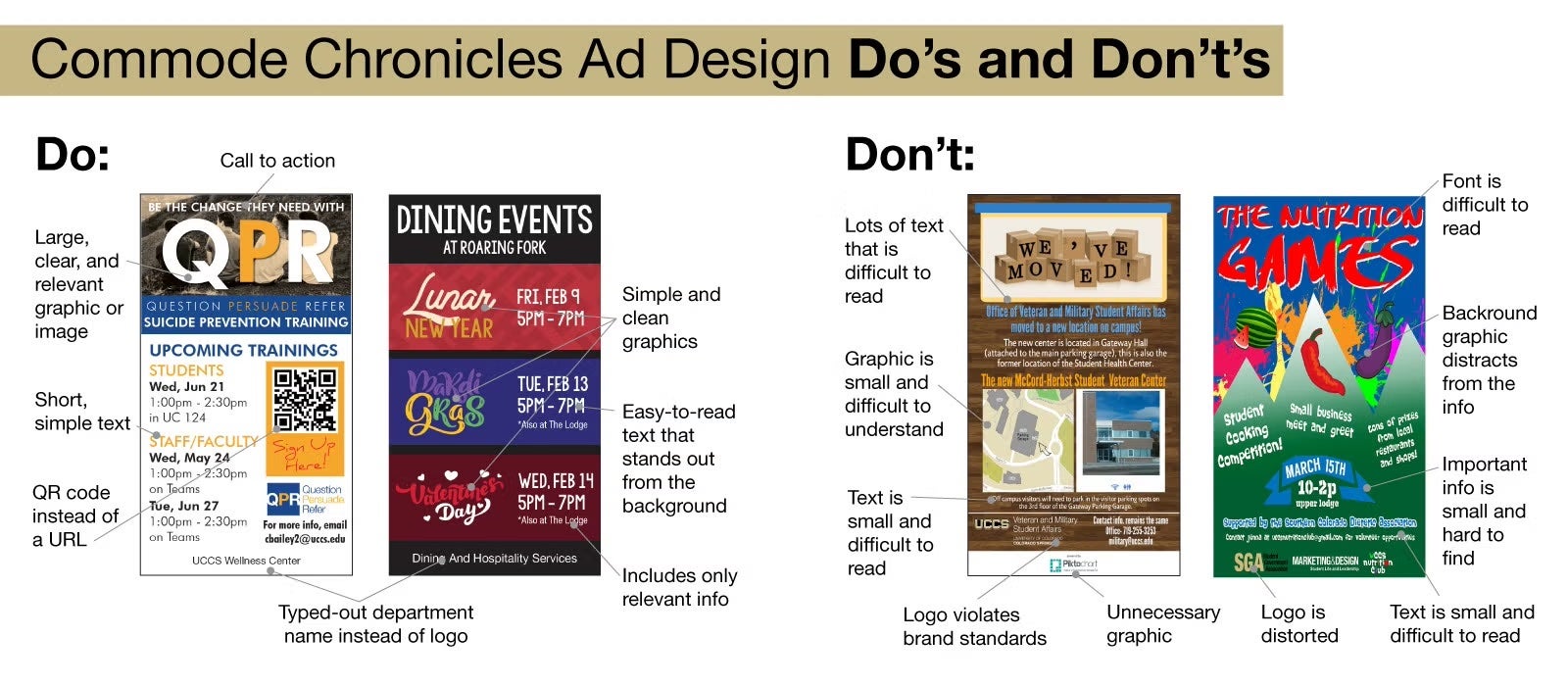
- Text. To keep it readable, fonts should be at least 11 pts. Minimize text as much as possible.
- Include a "call to action."
- Images. Use high-resolution graphics and photos.
- URLs. Short and only if necessary. QR codes are preferable, and should be at least 0.5"x0.5". Keep in mind, the more complicated the QR code, the larger it will need to be to scan correctly. Always test the code before sending it in!
- Contact information. Try to include at least one method for people to contact you, such as a website, phone number, or email.
- Department/event title. Include your department or organization title, but not a logo. Logos are unnecessary and will only take up precious ad space.
- Typefaces. Helvetica Neue is the University's preferred font.
- Print a copy of your ad at the final size. Text should be easily readable from a distance of several feet.
- CLEAN and SIMPLE is most effective.
We often publish a split issue of the Commode Chronicles: instead of only one version in all the stalls in campus, we create, publish, and hang two versions in the stalls so that we can accommodate up to 24 ads. Occasionally Auxiliary Service Marketing will create ads that take up multiple spaces at our discretion. All spots are available on a first come, first serve basis to all departments, organizations, and groups at UCCS. Auxiliary Services Marketing department reserves the right to place ads according to the space available. Preference is given to events and departments who have not advertised during the current semester. The Auxiliary Services Marketing department also reserves the right to edit submitted ads. All decisions on editing and ad placement are final.
| Issue # | Start Date | End Date | Submissions Open | Submissions Close (at noon) |
|---|---|---|---|---|
| #380^ | 12/8/25 | 12/21/25 | 11/24/25 | 12/3/25 |
| #381** | 12/22/25 | 1/19/26 | 12/8/25 | 12/17/25 |
| #382 | 1/20/26 | 2/1/26 | 12/22/25 | 1/14/26 |
| #383 | 2/2/26 | 2/15/26 | 1/20/26 | 1/28/26 |
| #384 | 2/16/26 | 3/1/26 | 2/2/26 | 2/11/26 |
| #385 | 3/2/26 | 3/15/26 | 2/16/26 | 2/25/26 |
| #386 | 3/16/26 | 3/29/26 | 3/2/26 | 3/11/26 |
| #387 | 3/30/26 | 4/12/26 | 3/16/26 | 3/25/26 |
| #388 | 4/13/26 | 4/26/26 | 3/30/26 | 4/8/26 |
| #389 | 4/27/26 | 5/10/26 | 4/13/26 | 4/22/26 |
| #390 | 5/11/26 | 5/24/26 | 4/27/26 | 5/6/26 |
| #391 | 5/25/26 | 6/21/26 | 5/11/26 | 5/20/26 |
| #392 | 6/22/26 | 7/12/26 | 5/25/26 | 6/17/26 |
| #393 | 7/13/26 | 8/16/26 | 6/22/26 | 7/8/26 |
* Runs during Fall Break
** Runs during Winter Break
+ Runs during Spring Break
~ Runs during Summer Vacation
^ Runs during Finals Week and Commencement
DJI Phantom Drone
Auxiliary Services Marketing has purchased a DJI Phantom 4 drone, which is available to bolster marketing efforts of auxiliary units on campus. There are multiple ways to request drone support:
- If you are an auxiliary department on campus and require any marketing efforts via the drone, please reach out to our office to discuss your needs and timing.
- If you are a non-auxiliary department or organization and require marketing efforts via the drone, feel free to reach out to talk with us. We may be able to arrange services, but a fee will be associated. Please see the chart below for costs.
- For those organizations on campus with whom we've made an agreement (University Communications, Public Safety, or Facilities), the use of the drone is available at a discounted rate. OR, if you are a member of the above-named organizations and someone on your team possess a current FAA drone pilot license, the drone may be borrowed at no cost.
- The person piloting the drone must have a current FAA drone piloting license.
- The drone can only be flown during fair weather and appropriate temperatures.
- Drone usage at UCCS must adhere to the campus policy located here. Please note that, due to federal regulations that take effect on December 22, 2025, DJI drones like ours CANNOT be used for federally-funded projects.
- Drone usage must receive approval for on-campus flight. The pdf version approval form can be found here and the online submission form for approval can be found here. Please be aware that this approval process takes roughly 2 weeks. Approvals are made by Jeff Greene and Austin Matheny.
- Prior to flying, you must alert both dispatch centers for the helicopters at Penrose and Memorial.
- Thirty minutes before flying, alert the dispatch center (in Denver) for our friends at Memorial Central at 720-848-8300.
- Alert the dispatch center for Penrose as well at 720-321-3900. That’s the most vital call, but they’d love to hear direct from us as well at 719.571.8954, and they will ask date, time frame, AND altitude.
- If either center alerts you to nearby traffic, defer to them. If you see a helicopter while flying, land immediately. Drones can hit rotors and destroy a helicopter (and the people onboard).
- Drone usage cannot endanger any campus community member at any time (i.e. cannot approach crowds, cannot fly over large groups, cannot approach vehicles or buildings too closely, etc.)
- If borrowing or renting the drone, the Drone Rental Agreement must be completed and submitted prior to picking up the equipment.
- When you rent the drone, you are responsible for it's care and condition. You will be responsible for any damages outside of normal wear and tear incurred during your use, and will be responsible for paying for repairs or--in case of a total loss--replacing the drone or associated equipment.
| 1/2 Day | Full Day | |
|---|---|---|
| Auxiliary Department borrowing the drone* | No cost | No cost |
| Auxiliary Department borrowing the drone and a pilot | No cost | No cost |
| Non-Auxiliary Department borrowing the drone* | $40 | $60 |
| Non-Auxiliary Department borrowing the drone and a pilot | $160 | $300 |
| University Communications, Public Safety, or Facilities borrowing the drone* | No cost | No cost |
| University Communications, Public Safety, or Facilities borrowing the drone and a pilot | $120 | $240 |
* Must have licensed pilot
Payment methods: We prefer you use a campus speedtype to pay for any costs associated with our advertising. However, in the case of student organizations, we have arranged for cash and check to be accepted at the UC Info Desk. You may also use a credit/debit card at the Info Desk, but an additional 3% will be added to cover transaction fees.
Shuttle Bus or Stand Alone Kiosks
Bus kiosk posters are generally put on display for one month at a time, starting at the beginning of each month. Please let us know if you require a different timeline.
There is no cost to rent a space in the kiosks, but the advertiser will be responsible for printing costs. Auxiliary Services Marketing works with the UCCS Copy Center to get these ordered for $137.50 per poster. Bus shelters are available to on-campus entities only. No outside advertising will be permitted.
- Dimensions: Final ads are 47" W x 68" H (overall area); 44" W x 65" H (copy area)
- You ad must include an affiliation—we recommend your official UCCS logo (if you have one) or a club logo, etc. We also highly recommend an email address or other format of contact for those viewing your sign. These may be small and unobtrusive, but nonetheless present.
- File size: 23.5" W x 34" H
- DPI: 150 dpi minimum; text and line art should be scanned in at 800-1000 dpi.
- File formats: .ai, .eps, .tif, .psd, .pdf; Save in CMYK mode only
- Margins: Full bleed recommended; leave minimum 1.5" margin for copy
- Images: High resolution, NO copyrighted materials, full bleed recommended
- Printing: All printing must go through Auxiliary Services Marketing to ensure proper sizing/formatting/material.
View a map of the bus kiosk stations.
Auxiliary departments can request for design assistance from Auxiliary Services Marketing, but other UCCS departments must submit their own design. If you are requesting design assistance, all requests should be made no later than a month before the kiosk ad install so so we have ample time to design, approve, and send the poster into production.
If designing the ad yourself, please communicate with us about your reservation needs at least a week prior to when you want the poster to appear. As you design the ad, keep in mind that text needs to be easily readable from a distance of several feet. We recommend printing a sample of the text on an 8.5"x11" sheet of paper, so you can determine how it will look at actual size. Our poster spots are limited, but we are happy to work with you on timing and location. Reach out to Jina Fagerburg with questions and requests.
For all questions about kiosk posters, please email Jina Fagerburg. If requesting design, please include the following information:
- Exact text as you'd like it to appear in the ad
- Event name, date, location, time, if applicable
- Contact information for people with questions
- QR Code, if applicable
- Any screen and printer fonts, supporting files, graphics (logos, graphic identities, etc), photos, images that you would like us to include.
Shuttle Bus Interior Ads
Please note: This method of advertising will be shifting as buses begin to transition from all paper to paper and screen hybrid. We will keep this page up to date with the most current info.
FREE to advertise, but your department is responsible for printing the posters. ALL shuttle bus ad designs MUST be submitted to Auxiliary Services Marketing for approval prior to printing. Advertising for on-campus departments and organizations is accepted for the interior of campus shuttle buses. Currently three of our buses are equipped with digital screens in place of rails for paper ads. If you want your ads to appear in the all the buses--both in paper and digital format--please note the additional requirements for digital advertising below.
Please note: The digital signs on the buses are about serving the larger campus, so ads need to come from someone in the UCCS community and need to be broad enough to serve the majority of the UCCS student population.
- The final, printed design should be 11" H x 17" W - landscape.
- You ad must include an affiliation—we recommend your official UCCS logo (if you have one) or a club logo, etc. You must also include an email address or other format of contact for those viewing your sign. These may be small and unobtrusive, but nonetheless present.
- Auxiliary Marketing needs to approve the content/design in advance prior to posting. Submissions may be sent to Jina Fagerburg for approval.
- After approval, 10 copies should be delivered to the parking office. The paper should be an 80lb (minimum) cardstock in order to secure into the bus signage holders. Two copies must also be laminated. The UCCS Copy Center can assist with printing.
- Please include an expiration date printed in in small text the bottom right of ads. This is the date by which you'd like your poster taken down from the buses.
- If an advertised event has a specific date or is time specific, the ad must be submitted at least two weeks before the date of the event.
- If ads have a specific time deadline, they are guaranteed space until the posted time OR for one month, which ever comes first. If space is available, non deadline-specific ads may be displayed for additional time at the discretion of Parking Services.
- To include your ad on the bases with digital monitors, we also require:
- a 1366x768 pixel image (JPG) to post on the screen in buses #1, 2, and 6.
- You are welcome to modify your original file/image, or send that file to us to modify to the proper dimensions for display.
Sidewalk Signs
We have two wind-resistant sidewalk signs available for use in Auxiliary Services Marketing. The signs are double-sided and loaded on springs on a base that can be filled with water. When filled, the base weighs about 100 pounds, which gives the sign some resistance to wind and weather. In addition, both sides have a sheet of plastic that snaps over the sign/poster fitted in the frame.
Our signs are fundamentally reserved for use for the Auxiliaries of the University of Colorado Colorado Springs, but may be available for rental by other departments or organizations. No outside advertising is allowed. Please contact Jina Fagerburg with a request if you are interested in renting the sidewalk signs.
Sidewalk signs are generally put on display for a week. Please let us know if you have any preferences on where you would like the signs to be displayed; otherwise we will place them to the best of our knowledge.
- Dimensions: 22x28 inches, 2-sided (you can do identical signs on both sides, or different signs for each side).
- Your ad must include an affiliation--we recommend your official UCCS logo (if you have one) or a club logo, etc. We also highly recommend an email address or other format of contact for those viewing your sign. These may be small and unobtrusive, but nonetheless present.
- Printing: You can print at the Copy Center on campus, or choose to tile the printing in Adobe and use multiple sheets of paper taped together to make one sign. The second option is less expensive, but takes more work. Auxiliaries can call on our office to take care of this process.
- Sign location: In conjunction with the standards of the University regarding sidewalk signs, our signs cannot be used in doorways, in any way that blocks the flow of traffic, past the date of the event (the signs have to be removed the day after an event), or without the approval of our office.
- Ad Design: Auxiliaries may call on our office for help to design and produce a sidewalk sign. If you are a non-auxiliary, you must provide the design yourself. Requests should be made no later than two weeks before the sign is to appear on campus. Signs are subject to availability.
The default RSS feed displays UCCS's main Instagram and Facebook accounts.
Departments can request to display their own social media feeds by creating a profile on the Reach dashboard and contacting ASM at bfagerbu@uccs.edu.